

Q: How to Program the DHC15A Weekly Digital Timer: 32 On/Off Programs, Battery Backup and Manual Override?
A:
1. What the DHC15A Can and Cannot Do
The DHC15A from DAQUAN is a weekly-program digital time switch for loads on a repeating seven-day pattern: lighting, water pumps, ventilation fans, and HVAC auxiliaries. Three published numbers define it. It stores up to 32 ON/OFF events, a built-in battery keeps the clock and program alive for about three years during mains loss, and its 16 A contact suits direct switching of many single-phase loads. Check the datasheet for derating guidance before switching motors or heaters.
Because it is a weekly timer, each weekday can hold its own program. The walkthrough below follows the operating logic common to DIN-rail digital weekly timers of this class. Button names and menu order vary slightly by version, so treat the steps as the general workflow and confirm each sequence against the manual shipped with your unit.
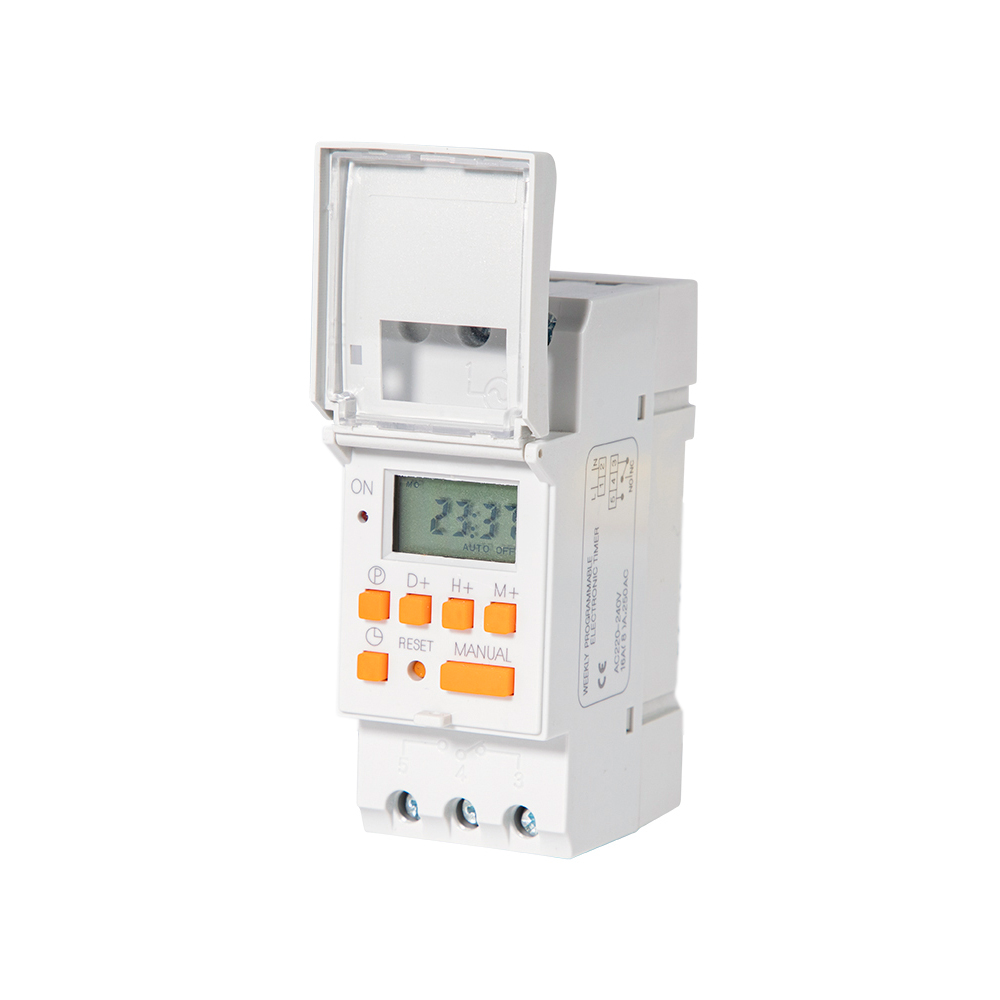
2. First Power-On: Set the Weekday and the Clock
Every ON/OFF decision uses the internal clock, so set it correctly before entering programs.
•Connect mains and wait for the LCD to light.
•Press and hold the clock or set key until the weekday indicator flashes.
•Step through the days, confirm today's weekday, then continue.
•Set the hour with the up and down keys, confirm, then the minutes, confirm.
•Press set, auto, or the same key to leave clock mode.
Set the clock in the morning so the first ON events are easy to watch. If the display resets soon after programming, the battery may be flat or the unit sat in storage; the manual describes the replacement procedure.
3. Build the Weekly Schedule: ON/OFF Events with Day Groups
Programming builds an event list: switch on at this time on these days, and off at that time on those days. Every ON should have a matching OFF.
•Press the prog or P key to enter program mode; the display shows an event number.
•Choose the weekday group first: one day, a block such as Mon to Fri, or all seven days.
•Enter the ON hour and minute, save, then enter the OFF time in the next slot and save.
•Repeat for every pair; each event counts against the 32-event total.
Example: a pump running at 06:30 and 18:00 daily needs four events per day, 28 for the week. An office lighting circuit might use two events, ON 07:00 and OFF 19:00 Mon to Fri, with the weekend left empty.
The classic errors are an ON event without its OFF partner and a wrong weekday group. Review the list after entry and delete unwanted events with the clr or del key; consult the manual if the list does not match.
4. Manual Override: Temporary Control, Then Back to Auto
Buildings are rarely as tidy as a schedule. A meeting runs late or a load must be held off during maintenance; manual override covers these moments without editing the program.
•Press the manual or on/auto key to cycle auto, manual on, and manual off.
•Manual on holds the output closed until the mode changes again.
•Manual off holds the output open, useful during work on the circuit.
•Select auto to restore program operation from the next scheduled event.
Some versions latch the override until you press auto; others return automatically at the next event boundary, as the manual states. Override is a temporary tool: permanent manual-on wastes energy and can leave a load running when it should be off.
5. Power Outages: What the Battery Preserves
The backup battery keeps the quartz clock running and holds all 32 stored events, so when power returns the schedule resumes from the correct weekday and time without reprogramming.
•Battery life is about three years, counted as standby operation.
•During an outage the output stays open; the timer only waits.
•On return of mains, the next programmed event fires normally.
•An exhausted battery can lose the program after a long disconnection; replace it at the interval the manual recommends.
For critical circuits, treat the battery as a maintenance item with a service life, and add the check to the annual preventive maintenance round.
6. Typical Applications and Schedule Patterns
•Lighting: car parks, corridors, and shopfronts suit fixed hours such as ON 18:30 and OFF 23:00 on working days, with a shorter weekend window.
•Pumps: transfer and irrigation pumps run best in short early-morning bursts that refill tanks before demand climbs.
•HVAC: ventilation fans follow occupancy; start air handling at 07:30 for a space used from 08:00 and stop it at 17:30.
Keep the load inside the contact rating. The 16 A figure is often for resistive loads, so check the datasheet for the rating that applies to motors and heaters, and use a contactor when the load exceeds the contact.
7. Commissioning Checklist
•Set the weekday and clock before entering events.
•Keep ON/OFF pairs inside the 32-event budget.
•Verify the weekday group of every event.
•Run a temporary early schedule and watch the output change state.
•Test manual override, then return the unit to auto.
•Record the battery service date in the maintenance log.
Done in this order, the DHC15A becomes a set-and-forget component that keeps lighting, pumps, and ventilation on their weekly rhythm through outages and busy days. Where this guide and your unit differ, the product manual is the final authority.
Discover DAQUAN’s CE/TUV-certified relays, timers, energy meters & WiFi smart switches for industrial automation. ISO9001 factory in Wenzhou, 30 km to airport, global OEM/ODM.
No. 172, Xinguang Avenue, Xinguang Industrial Zone, Liushi Town
Copyright © 2026 WENZHOU DAQUAN ELECTRIC CO.,LTD All rights reserved. Privacy Policy
 EN
EN
 Hot News