

Introduction: The Problem of the Unresponsive Time Switch
Digital time switches are critical components in modern commercial and industrial automation systems. They control a wide array of automated processes, including street lighting, HVAC scheduling, heating systems, and industrial machinery operations. By executing precise, pre-programmed schedule intervals, these devices optimize energy usage and reduce manual oversight.
However, field engineers and maintenance managers often face a common and frustrating problem: upon opening a control cabinet after a period of shutdown or during routine maintenance, they find the digital time switch's Liquid Crystal Display (LCD) screen is completely blank, and the unit is unresponsive. This guide explores why digital time switch displays go blank, how the internal backup battery system operates, and the step-by-step methods to reset, revive, or replace these crucial control components.
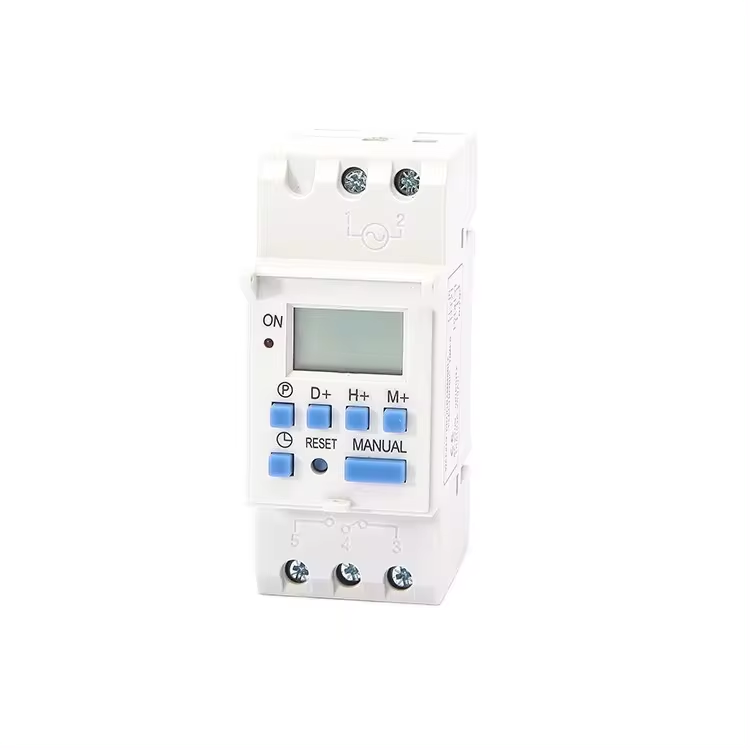
The Dual-Power architecture of Digital Time Switches
To understand why an LCD screen goes blank, we must first look at the internal electrical design of a professional digital time switch. Most modern electronic time switches utilize a dual-power architecture:
1. Main Power Supply (AC or DC Grid Power)
When the time switch is wired into an active electrical panel, it draws its primary operating power directly from the mains power grid (typically 110V AC, 220V AC, or 24V DC). This grid power operates the internal output relays, powers the backlighting of the LCD display, and provides energy to continuously trickle-charge the internal backup battery.
2. Internal Backup Battery Power Supply
To prevent the device from losing its programmed schedules, astronomical settings, and the current real-time clock during a power outage or routine panel shutdown, digital time switches are equipped with an internal backup battery. This battery is typically a small, high-density Lithium cell (such as a CR2032 or CR2450) or a rechargeable Nickel-Metal Hydride (NiMH) button pack. When main grid power is lost, the device instantly switches to this internal battery to keep the low-power microcontroller and real-time clock running, ensuring your automated schedules remain intact.
Common Causes of a Blank LCD Screen
When a digital time switch display goes blank, it is usually due to one of the following electrical or mechanical issues:
1. Deep Discharge of the Internal Backup Battery
If an electrical panel has been powered down or kept in storage for several months, the internal backup battery will slowly discharge as it keeps the real-time clock running. Once the battery voltage drops below the minimum operating threshold of the internal microprocessor, the device can no longer maintain its memory, and the LCD screen turns blank. If the battery is a rechargeable NiMH type, it may require a long charging cycle to recover.
2. Microprocessor Lockup or Program Crash
Like any microcontroller-based electronic device, a digital time switch can experience a software lockup or program crash. This is often triggered by heavy electrical noise, voltage transients, or electromagnetic interference (EMI) on the mains power line when nearby heavy machinery or contactors switch on and off. During a lockup, the processor halts, causing the LCD display to go blank or freeze.
3. Lack of Main Grid Power
In some designs, the LCD display is engineered to turn off or enter a deep-sleep power-saving mode when mains grid power is disconnected, even if the internal backup battery is fully functional. If the main circuit breaker is tripped or the wiring terminal has a loose connection, the display may appear blank until grid power is restored.
4. End-of-Life Battery Degradation
Non-rechargeable Lithium backup batteries have a typical shelf life of 5 to 10 years depending on storage conditions and temperature. Once the battery reaches the end of its life, it can no longer hold a charge or maintain voltage, leading to a permanent blank screen whenever main power is disconnected.
Step-by-Step Resetting and Troubleshooting Guide
If you encounter an unresponsive or blank digital time switch on-site, use this systematic diagnostic and recovery process:
Step 1: Verify and Measure Main Input Power
Before attempting any battery or reset procedures, ensure that the time switch is actually receiving its rated operating voltage.
Step 2: Perform a Hardware Reset
Most professional digital time switches feature a small, recessed physical reset button on the front faceplate, often marked as 'R', 'RST', or 'RESET'. This button is recessed to prevent accidental pressing.
Step 3: Allow the Internal Battery to Recharge
If the time switch has been stored in an unpowered state for an extended period, the internal rechargeable NiMH battery may be completely depleted.
Step 4: Access and Replace the Internal Battery (For Serviceable Models)
If the display works fine while main power is connected but immediately goes blank and loses its time setting when main power is switched off, the backup battery is dead and must be replaced.
Why DAQCN Digital Time Switches Ensure Data Integrity
At DAQCN, we engineer our digital time switches with industrial reliability as our highest priority. Our time switches feature several key design advantages to eliminate blank-screen issues:
For B2B wholesalers and panel builders, sourcing DAQCN digital time switches ensures high-precision timing control and minimizes customer service calls regarding dead batteries or lost programs.
Conclusion: Maintaining Time-Critical Operations
A blank LCD display on a digital time switch is a common field issue that can easily be diagnosed and resolved. By verifying primary input voltage, executing a hardware reset, allowing the internal battery to recharge, or replacing dead lithium button cells, engineers can quickly restore automated scheduling. Partnering with a high-quality supplier like DAQCN guarantees access to robust, noise-resistant time switches that protect your automated systems from electrical interference and data loss.
Discover DAQUAN’s CE/TUV-certified relays, timers, energy meters & WiFi smart switches for industrial automation. ISO9001 factory in Wenzhou, 30 km to airport, global OEM/ODM.
No. 172, Xinguang Avenue, Xinguang Industrial Zone, Liushi Town
Copyright © 2026 WENZHOU DAQUAN ELECTRIC CO.,LTD All rights reserved. Privacy Policy
 EN
EN
 Hot News